
WorkWhile
WorkWhileBusiness
4.41.61K Reviews
- Version
- 2.66.0
- Installs
- 500.00K
- Age Rating
- Everyone
Screenshots



Our Review of WorkWhile
 Analysis by Appyee
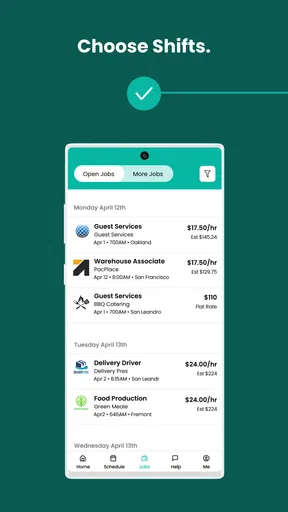
Finding flexible work can be harder than finding a job listing. You may need something nearby, something that fits around another commitment, and something you can act on without spending money just to browse opportunities. WorkWhile is a free business app from WorkWhile built around that practical problem: helping people find jobs in their area. I see it as a focused tool for people who want to look at local work options from a phone rather than search across a broad employment website.
My overall impression is that its value depends less on polished extras and more on whether the jobs available through the service match your location, schedule, and willingness to take on the kind of work presented. That makes it potentially useful for flexible workers, people looking for a change, and anyone who wants a more direct starting point than a general search engine. It is less compelling for someone seeking a carefully planned long-term career path, a highly specialized professional role, or a complete replacement for a traditional hiring process.
How WorkWhile fits into a real job search
The app belongs in the business category, but I would not approach it like a full career-management suite. Its central purpose is narrower and easier to understand: open the app, look for work in your area, and decide whether the available opportunities are worth pursuing. That focus is helpful because it avoids burying the main task under unrelated productivity tools.
In everyday use, I would treat WorkWhile as one part of a job-search routine rather than the only place to look. For example, someone with changing availability might check nearby opportunities during a commute, compare them with their commitments, and then use a separate calendar or notes app to keep track of follow-up tasks. The advantage is speed at the discovery stage. The limitation is that finding a listing is not the same as securing suitable work, so the user still needs to evaluate the details carefully.
The app was released on October 16, 2019, and the current version is 2.66.0. It supports Android 8.0 and later, which means it is aimed at a reasonably broad range of Android phones rather than only the newest devices. That matters for people using an older handset as their main work phone. I would still keep the app updated, especially when job availability and account-related functions are central to the experience.
WorkWhile has reached over 500 thousand installs and holds a 4.4 average from around 7 thousand ratings, with roughly 2 thousand written reviews. Those figures suggest that many users find the basic idea worthwhile, but they should not be mistaken for a promise that every local search will produce a good match. A job-finding app can feel very useful in one area and much less useful in another because the quality of the opportunity pool is naturally tied to location.
What the free price really means
There is no purchase price to access the app itself: WorkWhile is free. That makes the initial decision easy. You can install it, explore whether it is relevant to your circumstances, and judge the usefulness of its local results without committing money to the download. For someone unemployed, between jobs, or simply trying to increase income, that low barrier is a meaningful advantage.
At the same time, free access should be judged correctly. The app removes a financial barrier to searching; it does not guarantee paid work, a certain number of opportunities, or a particular income. I would not install it expecting the word “free” to translate into immediate earnings. The practical value comes only if the available work fits your area, skills, transportation, and schedule.
This distinction is especially important when comparing WorkWhile with paid career services. A subscription-based platform may offer additional planning or professional tools, but paying for access does not automatically make its listings more suitable. WorkWhile’s strongest value proposition is the chance to begin locally without paying for the search itself. If your goal is simply to discover nearby work, that can be enough reason to try it.
The content rating is Everyone, so the app is presented as suitable for a broad audience. I would still make the same sensible checks I would make with any employment service: understand what a role involves, confirm the practical requirements, and avoid treating a short listing as a complete explanation of the work. The age label describes the app’s general suitability, not whether every opportunity is suitable for every person.
A useful workflow for testing the app
My advice would be to give WorkWhile a structured first session instead of scrolling casually and forming an opinion too quickly. Start by checking whether the location results are genuinely reachable. A listing that looks attractive on a screen may be inconvenient once travel time, transport costs, and your available hours are considered. This is one of the most important trade-offs in local job apps: proximity can matter as much as the role itself.
Next, compare several opportunities before deciding which ones deserve your attention. Looking at only the first result can create a false impression of what the app offers. I would note the type of work, the timing, the distance, and any requirement that could prevent you from accepting it. This small comparison habit turns the app from a browsing tool into a more disciplined part of a job search.
A less obvious benefit of this approach is that it helps reveal whether the service is a good fit for your pattern of availability. Someone who can work only occasional shifts may value the app differently from someone seeking predictable hours. If the nearby options repeatedly conflict with your schedule, the problem may not be the interface; it may be that a traditional employer, a local staffing agency, or a broader employment platform is better suited to your needs.
I would also use a separate note to record which opportunities I have already considered and what action is needed next. That prevents repeated checking from becoming a substitute for progress. WorkWhile can help with discovery, but a simple personal system is still useful for remembering where you applied, what you need to ask, and when you should follow up.
Where the app delivers real value
The clearest value is convenience. A local search on a phone is easier to repeat than a search that requires sitting at a computer, especially for people whose schedules change from day to day. If I had a free afternoon unexpectedly, I could use the app to see whether there were relevant nearby possibilities rather than waiting for a weekly job-search session.
That convenience also makes WorkWhile useful for people testing a new work direction. You may not yet know whether a particular type of role suits you, and a local opportunity can provide a practical starting point. The app is not a career counselor, but it can help turn a vague intention—“I need something different”—into a list of concrete possibilities to evaluate.
Another strength is its straightforward positioning. Many general job boards mix permanent employment, freelance work, internships, senior roles, remote positions, and unrelated listings. A service centered on finding work in your area can feel more relevant when your priority is immediate practicality rather than an exhaustive professional profile.
For a realistic example, imagine a person whose regular hours have been reduced and who needs additional work nearby. They could check WorkWhile before committing to a distant opportunity, compare the local choices with their existing schedule, and focus their effort on roles that do not create an unreasonable travel burden. The app’s value in that situation is not just showing listings; it is reducing wasted time in the early search.
There is also value for users who do not want to pay for a job-search subscription. Since the app is free, it can sit alongside other tools without adding another recurring expense. That makes it a sensible first experiment for someone who wants to broaden their options while keeping the search budget at zero.
Trade-offs that should shape your expectations
The biggest limitation is that local relevance can work both ways. If WorkWhile shows suitable opportunities in your area, the focused approach is a strength. If your area has few appropriate listings, the same focus becomes restrictive. A larger job board may expose more possibilities, including remote work or positions outside your immediate region, while WorkWhile may be more useful as a local supplement.
Availability is another practical concern. A job-search app is only as helpful as the opportunities a user can actually pursue. I would not assume that a promising title means the role matches my experience, transport options, physical preferences, or desired schedule. The app can shorten the route to discovery, but it cannot make an unsuitable job suitable.
There is also a difference between flexible work and predictable work. People who need stable hours, consistent responsibilities, or a clearly mapped promotion path may prefer applying directly to established employers or using a professional recruitment platform. WorkWhile makes more sense when flexibility and local access matter more than a long-term career framework.
Users should also be prepared to do their own verification before accepting an opportunity. Read the full details available for each role, consider the practical cost of getting there, and make sure you understand what is expected. This is not a criticism unique to WorkWhile; it is a necessary habit whenever a mobile app makes it easy to move quickly from browsing to applying.
The app may also be a poor choice if you want extensive tools for polishing a résumé, building a professional network, or managing a multi-stage career campaign. Those needs call for a broader platform. WorkWhile’s focused purpose is useful precisely because it does not try to be everything, but that also means it should not be judged as a complete replacement for every other job-search resource.
Who is most likely to benefit
I would recommend trying WorkWhile first if you are looking for local job opportunities, have changing availability, and want to explore options without paying an access fee. It is particularly sensible for people who prefer a phone-based search and want to check opportunities repeatedly rather than conduct one large search and stop.
It may also suit someone returning to work after a break or experimenting with a new routine. In those situations, a local opportunity can be easier to evaluate than a distant or highly formal application. You can think about the commute, the timing, and the practical fit before investing too much effort.
People who already have a full-time role but want additional work may find the location-first approach useful, provided they compare every opportunity with their existing obligations. The app is not a shortcut around scheduling conflicts. Its benefit is that it can make the search stage more convenient while you make the final judgment yourself.
I would be more cautious about recommending it as the main tool for experienced professionals seeking a narrow specialty, senior management role, or carefully defined career progression. Those users may get more value from industry-specific networks, direct employer applications, or recruitment services designed around qualifications and professional history.
It is also not ideal for someone who cannot travel to nearby work or who needs fully remote employment. In that case, the app’s local emphasis may not align with the actual requirement. A remote-focused platform or a general job board with strong location and work-mode filters would probably be a better first choice.
How it compares with ordinary alternatives
Compared with a general job board, WorkWhile feels more targeted when your question is “what can I find near me?” rather than “show me every possible role.” A general platform may offer more categories and broader search coverage, but it can require more filtering. WorkWhile’s appeal is the possibility of a shorter path from opening the app to seeing locally relevant work.
Compared with searching employer websites one by one, it offers a more convenient starting point. Direct applications can be better when you already know which companies you want, especially if you are pursuing a long-term position. WorkWhile is more useful earlier in the process, when you are still discovering what is available and where.
Compared with a staffing agency, the app gives you a self-directed way to begin. An agency may provide more human guidance or help interpret your experience, while an app lets you browse privately and at your own pace. The better option depends on whether you need personal support or simply want quick access to local possibilities.
Compared with paid career tools, WorkWhile has the obvious advantage of free entry. But paid tools may justify their cost for users who need résumé feedback, networking, application tracking, or professional coaching. I would not pay for a specialized service unless those additional functions solve a problem I actually have; likewise, I would not expect WorkWhile to provide them just because it is part of a job search.
My verdict on trying WorkWhile
WorkWhile is worth trying when your priority is discovering work in your area without paying to start the search. Its free price, Everyone content rating, and support for Android 8.0 and later make it easy for a broad range of Android users to test. The 4.4 average and substantial user activity are encouraging signs, but the real test is personal: do the opportunities near you fit your schedule and practical limits?
I would use it as a focused local-search tool, not as a complete employment strategy. Give it a fair trial, compare several listings, calculate the real travel and time commitment, and keep a separate record of applications or follow-ups. Those steps help you capture its convenience without confusing availability with suitability.
My recommendation is to install it if local flexibility matters more to you than a full professional job-search toolkit. Skip it, or use it only as a secondary option, if you need remote work, highly specialized roles, extensive career planning, or guaranteed schedule stability. For the right user, WorkWhile can remove friction from the first stage of finding work. For the wrong user, its local focus will feel limiting, and a broader or more specialized alternative will deliver better value.
Verdict
Strengths of WorkWhile
- Flexible shifts let you choose work around your personal schedule.
- Useful for finding nearby temporary and part-time job opportunities.
- Clear job details help compare pay, location, and shift requirements.
- Suitable for workers seeking quick access to local employers.
- Can help build experience through short-term assignments.
Limitations of WorkWhile
- Job availability may vary considerably depending on your location.
- Some shifts require transportation that may not be provided.
- Last-minute schedule changes can disrupt personal plans.
- Competition for attractive shifts may be high.
- Earnings and opportunities can be inconsistent between assignments.
Similar Picks in This Category
View All
LinkedIn: Community & Network
LinkedIn3.8

Zoom Workplace
zoom.com4.1

Microsoft Teams
Microsoft Corporation4.6

Meta Business Suite
Meta Platforms, Inc.4.6

Webex Meetings
Cisco Systems, Inc.4.5

TeamViewer Remote Control
TeamViewer4.4
Frequently Asked Questions
What is WorkWhile, and how does the app work?
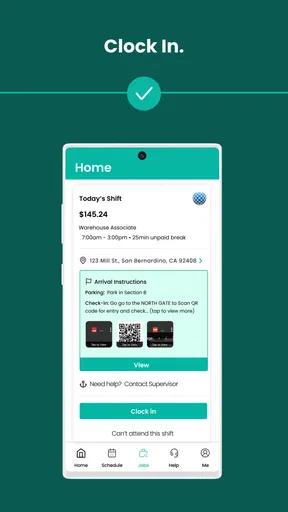
WorkWhile is a flexible work platform designed to connect people looking for shifts with businesses that need temporary or on-demand staff. After creating a profile, you can review available opportunities, check the location, schedule, pay information, and job requirements, then apply for suitable shifts. The exact experience may depend on your city, qualifications, and the availability of participating employers.
Who can use WorkWhile, and what requirements are needed?
WorkWhile is generally intended for adults seeking flexible shift-based or temporary work, although eligibility requirements can vary by location and position. You may need to provide personal information, verify your identity, complete onboarding steps, and meet specific job requirements. Some shifts can require previous experience, transportation, physical ability, certifications, or authorization to work in the relevant country.
How do payments work on WorkWhile?
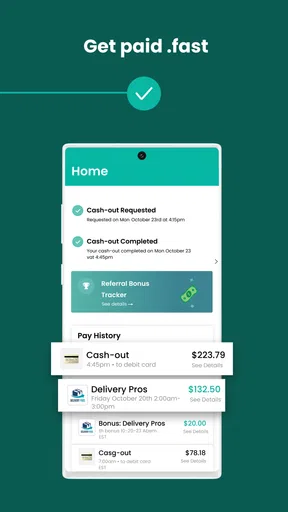
Payment details can vary depending on the employer, shift, location, and the terms displayed in the app before you accept a job. WorkWhile typically shows the expected compensation and relevant shift information so workers can make an informed decision. Before relying on a payment date or amount, carefully review the listing, account information, cancellation rules, and any applicable taxes or deductions.
Can I choose my own schedule and cancel a shift?
One of WorkWhile’s main attractions is the opportunity to find shifts that fit around your personal schedule, but flexibility does not mean every shift can be changed freely after acceptance. Availability depends on local demand and the positions listed in the app. Read cancellation, lateness, attendance, and no-show policies carefully, because repeatedly abandoning accepted shifts could affect your account or access to future opportunities.
Is WorkWhile safe and worth downloading?
WorkWhile can be useful for people who want to discover short-term or flexible work without contacting employers individually, especially when suitable shifts are available nearby. However, users should protect their account information, verify job details, and communicate only through official channels. Results may differ significantly by location, and the app should be viewed as a job-matching tool rather than a guarantee of steady employment.
